MT4's own data
- Price
- Interpolated from 1-minute bars by a fixed rule
- Spread
- One fixed number that you enter in the tester
- What you do
- Nothing; the data is already in MT4
For the MetaTrader 4 (MT4) strategy tester
Real tick-by-tick prices and real variable spreads. Install once; every MT4 you open is already set up.
How it works
mttick prepares real ticks for the MetaTrader 4 (MT4) strategy tester. No data to import.
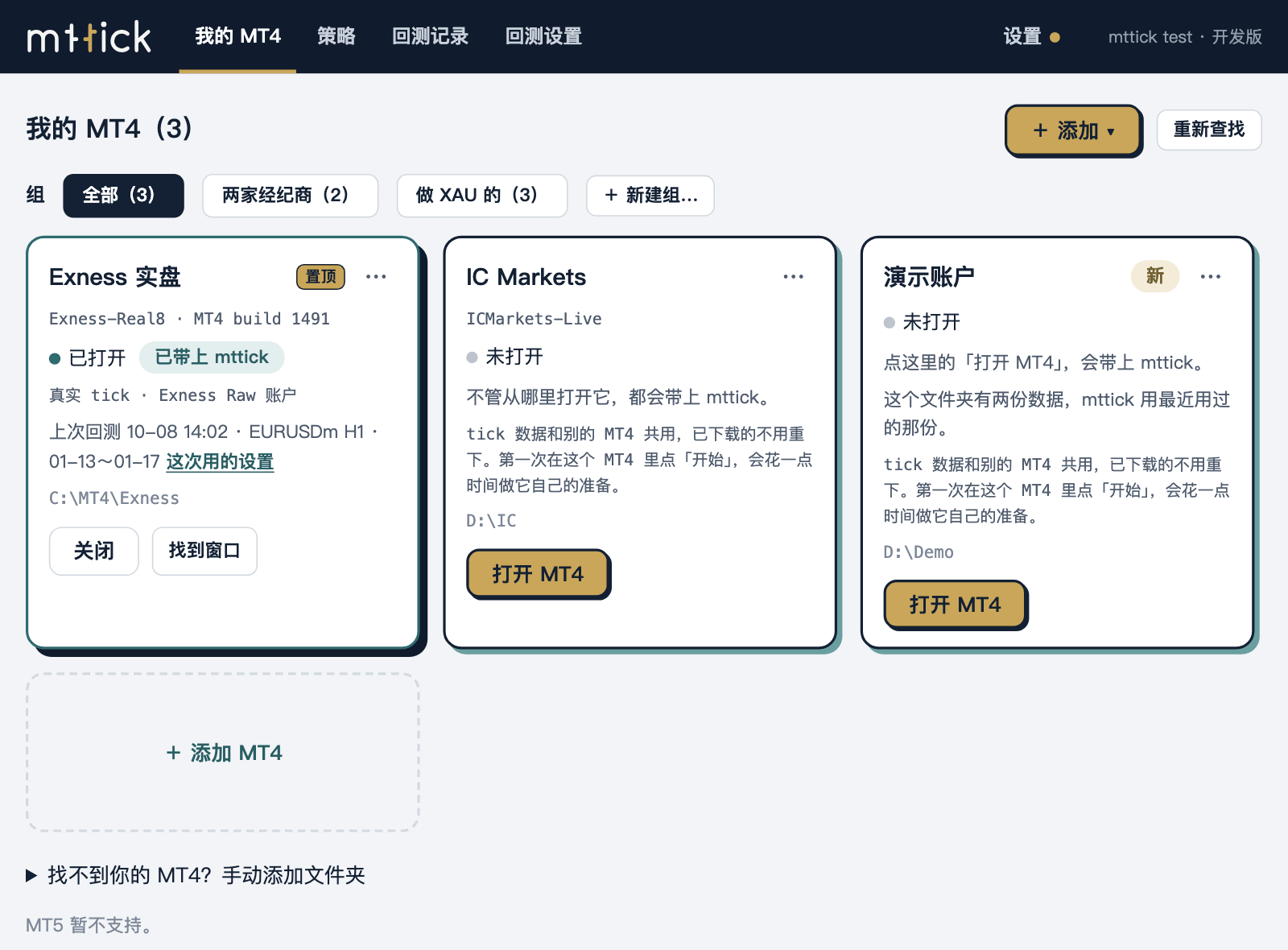
Run the installer. When it finishes, the mttick window lists the MT4 copies it found.
The tester's Settings page has one more tick box: "Use mttick real ticks". Tick it.
The data is prepared automatically, and data that is already prepared needs no waiting. Then the backtest runs as usual.
Data
MT4's own way does not go away: untick the box and the tester goes back to MT4's own data.
The window
Tick the box and you can backtest. If you have several MT4 copies and test many EAs, you will use these.
One card per MT4: whether mttick is switched on, and how many real ticks the last backtest used. Several MT4 copies share one set of price data, and you can put them in a group and open them together.
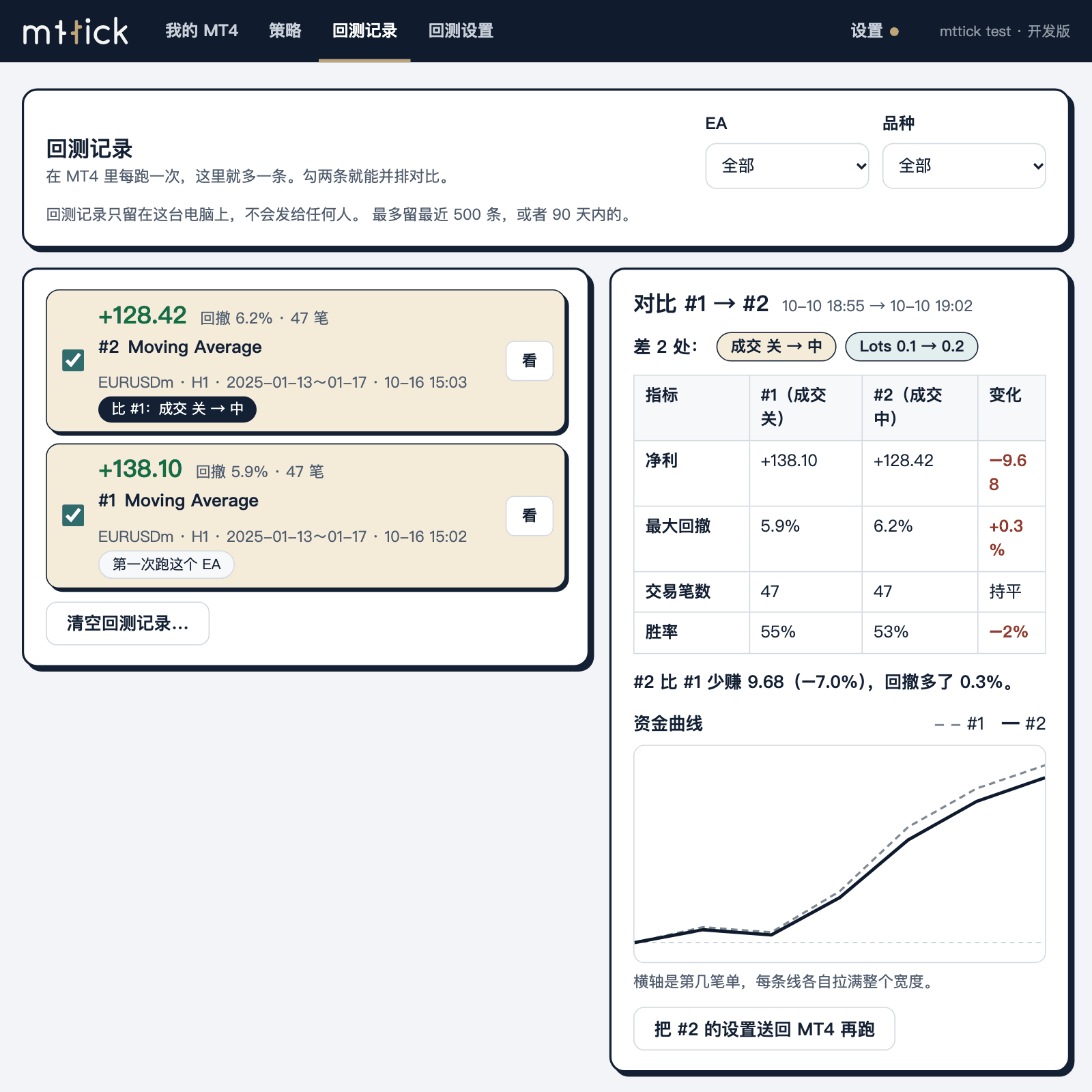
Want to compare several parameter sets or EAs in one MT4? Choose them and press Start once: mttick runs several ordinary backtests at the same time on this computer and puts the results in the run records.
One file per EA: notes, parameter files, version backups. Before each Start, mttick backs up this EA's files on your computer. Nothing is uploaded and the contents of .ex4 files are not read.
Each backtest's spread, fill model and number of real ticks are recorded, and two backtests can be compared side by side.
The price data is kept on our servers, compressed into small blocks by day. You download only the dates you use, not tens of gigabytes of raw files each.
Dukascopy, or an Exness account type. The spreads differ, so the results differ; you choose which is closer to your broker.
Measured
Change the spread and the result changes. These three numbers show only that.
The numbers are the total net profit in the backtest report. MT4's bundled Moving Average, EURUSDm, H1, 2025-01-13 to 01-17, 258,555 ticks. One EA and one week of data is a small sample and shows only the direction. A point is the smallest step of a five-digit quote.
Data coverage
Real ticks from two sources, kept on our servers and downloaded to your computer when you press Start.
The 51 symbols newly added from Dukascopy start in 2023-10, and their history is still being filled backwards. Each symbol's start is on Data coverage; how to choose between the two sources is on Choosing a data source.
Limits
MT4's program files are left as they are. mttick only loads an extension together with MT4 when you open it.
Multi-timeframe history is built from the same ticks and put in a folder with mttick in its name. Your chart history is not changed by a single byte.
It has a window and a tray icon, and everything it writes into the MT4 folder is listed in the docs page "What mttick does on your computer". It does not evade antivirus software.
It does not touch your trading account. mttick does not place, modify or close orders, does not read trading passwords, and does not connect to your broker. To read the trading conditions it briefly runs an MT4 copy that has no account of yours and does not log in. MT4 may contact outside servers when it starts; mttick does not control that.
Pricing
Three plans. One subscription is used on one computer and you can move it to another yourself. Try it free for 14 days first.
Pay month by month.
All features · All data (Dukascopy and Exness) · Transfer to another computer yourself · 1 computer
Pay once a year.
All features · All data (Dukascopy and Exness) · Transfer to another computer yourself · 1 computer
Pay once, use it for the long term.
All features · All data (Dukascopy and Exness) · Transfer to another computer yourself · 1 computer
Prices will be shown on the pricing page once announced
FAQ
Not open yet
The release is not open for download yet. The installer is going through code signing and will open when that is done.
Tell me when the download opens Download Not open yet Changelog